
導入ガイド
MOD の動作概要
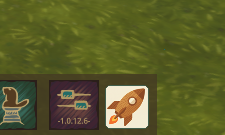
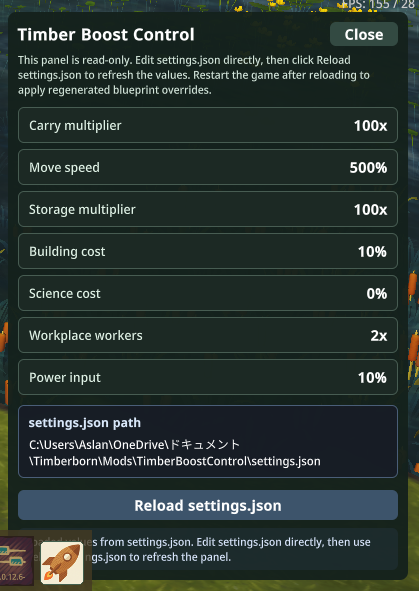
TimberBoostControl は Timberborn の bottom bar にランチャーを追加し、settings.json を読み込んで MOD フォルダ内へ .blueprint.json override を生成します。現在のゲーム内パネルは読み取り専用で、値の確認、解決済み settings.json パスの表示、そして再読み込みによる再生成を担当します。
前提条件
- Windows
- Timberborn
1.0.x .NET Framework 4.xのcsc.exeがC:\Windows\Microsoft.NET\Framework64\v4.0.30319\csc.exeに存在することbuild.ps1から参照できる Timberborn のローカルインストール
DLL のビルド
powershell
powershell -ExecutionPolicy Bypass -File .\build.ps1標準以外の場所に Timberborn がある場合は、-GameRoot を指定します。
powershell
powershell -ExecutionPolicy Bypass -File .\build.ps1 -GameRoot "C:\Path\To\Timberborn"MOD の配置
Code.dllをビルドします。- このリポジトリを
Documents\Timberborn\Mods\TimberBoostControlにコピーするか、そこへ向くジャンクションを作成します。 - Timberborn を起動し、Mod Manager で有効化します。
実行フロー
- 起動時に MOD は作業ディレクトリを初期化し、
settings.jsonが無ければ作成します。 - その後、現在の設定から blueprint override を即座に再生成します。
- ゲーム中は bottom bar のランチャーからパネルを開いて値を確認できます。
settings.jsonを外部エディタで編集します。- パネルの
Reload settings.jsonを押して再生成します。 - 再生成した内容を完全に反映するため、Timberborn を再起動します。
スクリーンショット
bottom bar ランチャー
コントロールパネル
生成ファイル
ジェネレーターは .generated-files.txt に記録された旧ファイルを掃除し、最新の override を出力してから追跡ファイルを書き直します。主な出力先は次のとおりです。
Buildings/**.blueprint.jsonCharacters/**.blueprint.json.generated-files.txt
この方式により、同じ設定で何度でも安全に再生成できます。