
Remote GPU workers
This document records the implemented architecture and operating plan for using GPUs on local machines without moving the OpenFace control plane out of its Proxmox LXC.
TIP
The pull protocol, PostgreSQL persistence, capability scheduler, leases, HTTP/WebSocket runtime proxy, and separate Docker Compose stack are implemented. The feature defaults to disabled, so CPU placement does not change until an administrator enables it.
Implementation status
| Capability | Status |
|---|---|
| One-time enrollment and revocable worker credentials | Implemented |
| Heartbeats, GPU capabilities, and VRAM constraints | Implemented |
| FIFO claim, short leases, and expiry recovery | Implemented |
| Commit-pinned clone, Docker build, and GPU run | Implemented |
| Authenticated HTTP/WebSocket runtime gateway | Implemented |
| Remote stop and container cleanup | Implemented |
| Multiple workers and per-worker concurrency limits | Implemented |
| Drain/revoke controls in the admin UI | Planned |
| Dynamic VRAM reservations | Planned; claim-time free VRAM is enforced |
The implementation is split across spaces-runner/gpu_control.py, gpu-worker/worker.py, and docker-compose.gpu-worker.yml.
Goals
- Keep Forgejo, PostgreSQL, the portal, authentication, and scheduling state on the LXC.
- Run selected Space, inference, and benchmark workloads on one or more trusted GPU machines.
- Use the existing trusted LAN without adding an overlay network.
- Preserve the current
/run/{owner}/{repo}/URL and OpenFace permission checks. - Allow a GPU machine to disappear without losing repositories or durable platform state.
- Add more GPU machines later without redesigning the control plane.
The first version does not attempt public multi-tenant isolation, automatic cross-cloud scheduling, distributed training, or transparent migration of a running container between workers.
Target architecture
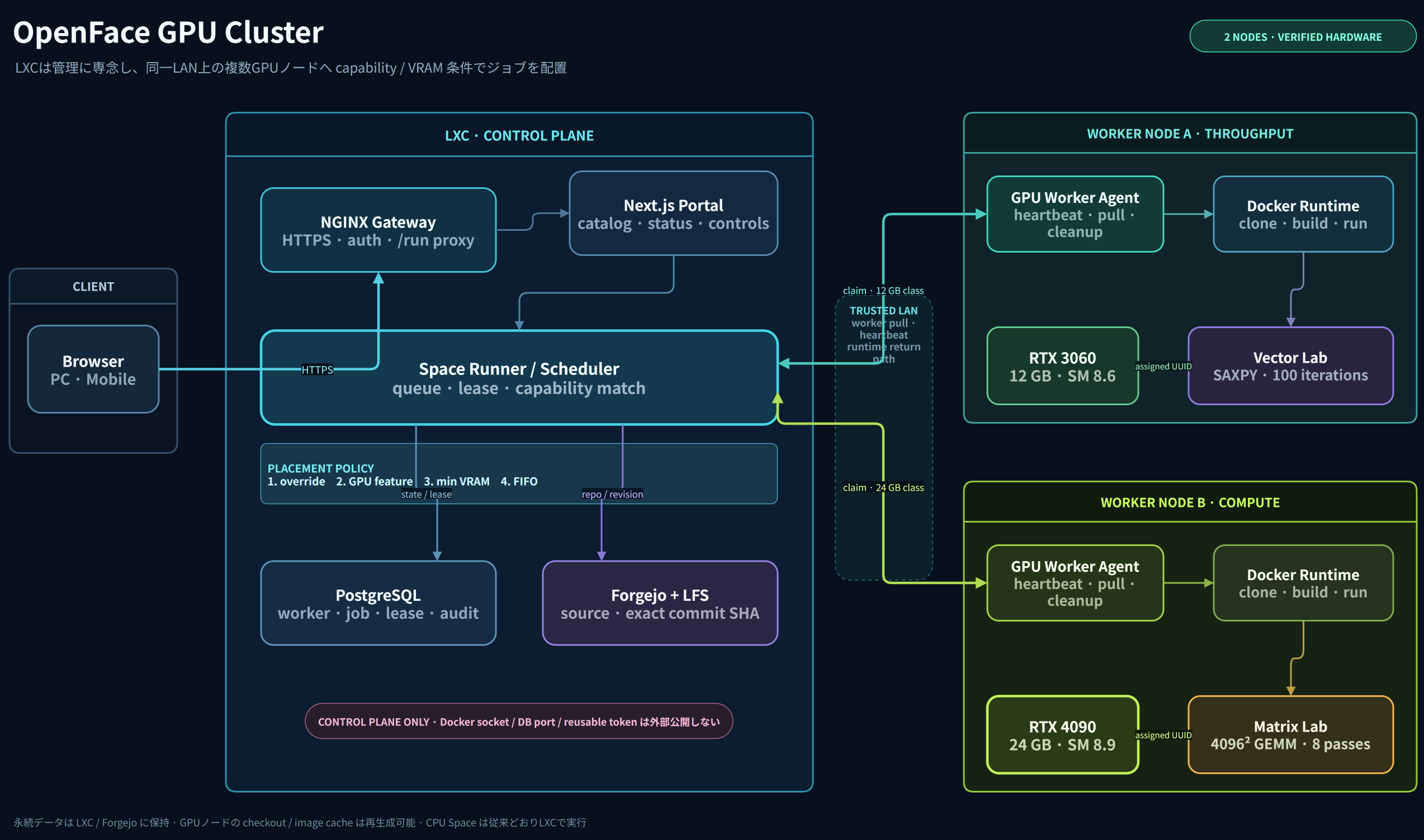
The editable source of truth is gpu-cluster-topology.drawio. The PNG and SVG exports are generated with the draw.io Desktop CLI and checked with SVG overlap lint plus a visual review of the PNG.
The LXC is the control plane. A GPU machine is an ephemeral execution node. The worker initiates outbound requests to OpenFace and claims work; the LXC never receives the worker's Docker socket.
The verified topology shows two independently schedulable classes: RTX 3060 for memory-throughput fixtures and RTX 4090 for larger compute fixtures. The same protocol supports additional workers; the diagram does not imply that both cards must share one Docker host.
Responsibility boundaries
| Component | Responsibility |
|---|---|
LXC gateway | Public URL, TLS, authentication entrypoint, HTTP/WebSocket proxy |
LXC frontend | Catalog, worker/runtime status, controls, and repository presentation |
LXC spaces-runner | Scheduling, authorization, worker registry, job state, and route selection |
| LXC Forgejo/LFS | Source repositories, revisions, large durable artifacts, issues, and permissions |
| LXC PostgreSQL | Worker inventory, heartbeats, leases, jobs, runtime routes, and audit events |
| GPU worker | Capability reporting, job claim, clone/build/run, logs, and cleanup |
| GPU Docker engine | Per-Space containers, image layers, and disposable build cache |
Durable results should return to Forgejo/LFS or another LXC-managed store. Worker-local checkouts, images, and caches must be reproducible and disposable.
Network and security model
Use reserved or static addresses on the existing trusted LAN for LXC-to-worker traffic. Permit the worker API port only between the LXC and the GPU host. Do not expose the Docker daemon, Docker socket, PostgreSQL, or an unauthenticated worker port to other LAN clients or the internet.
The recommended protocol is pull-based:
- An administrator creates a one-time worker enrollment token.
- The worker exchanges it for a revocable worker credential.
- The worker registers a stable ID and reports GPU capabilities.
- It sends a heartbeat and asks for a compatible job.
- The scheduler returns a short lease for one job.
- The worker reports build, runtime, health, and completion events.
Worker credentials should be scoped to worker endpoints, stored outside Git, hashed at rest where possible, and individually revocable. Runtime proxy requests must still pass the existing Forgejo permission check.
Capability and scheduling model
The worker heartbeat should report:
- worker ID and display name;
- operating system and architecture;
- Docker availability and version;
- GPU vendor, model, count, and total/free VRAM;
- driver and CUDA runtime compatibility;
- current jobs, configured concurrency, and disk availability;
- supported workload features, such as
nvidia,cuda, orcpu.
Repository topics such as gpu, cuda, vram-12gb, and local-gpu remain useful for discovery. Scheduling requirements and administrator overrides belong in OpenFace's database rather than a rigid repository-specific schema. An initial scheduler can use:
- explicit administrator override;
gpuorcputopic;- required minimum VRAM;
- an online compatible worker with available capacity;
- FIFO order among otherwise equal jobs.
CPU Spaces continue to use the LXC runner by default. GPU jobs wait when no compatible worker is online instead of silently falling back to CPU.
Job lifecycle
Every transition should record the worker, repository revision, image ID, timestamps, and a concise reason. A heartbeat timeout marks the runtime unavailable; it must not report a stale Space as running.
Proposed worker API
All endpoints are private, authenticated, versioned, and rate-limited.
| Endpoint | Purpose |
|---|---|
POST /api/v1/workers/enroll | Exchange a one-time token for worker credentials |
POST /api/v1/workers/register | Register identity and initial capabilities |
POST /api/v1/workers/{id}/heartbeat | Refresh liveness, resources, and active jobs |
POST /api/v1/workers/{id}/jobs/claim | Claim one compatible queued job with a lease |
POST /api/v1/workers/{id}/jobs/{job}/events | Report build, health, logs, and terminal state |
POST /api/v1/workers/{id}/jobs/{job}/lease | Renew an active job lease |
DELETE /api/v1/workers/{id} | Revoke a worker and prevent new claims |
The worker should send bounded log chunks rather than giving the LXC arbitrary filesystem access. API requests need idempotency keys so retrying after a network interruption does not start duplicate containers.
Local GPU host
For a Windows GPU machine, prefer Docker with WSL2 GPU support or a dedicated Linux installation with the NVIDIA Container Toolkit. Verify GPU access before enrolling the worker:
docker run --rm --gpus all nvidia/cuda:12.6.3-base-ubuntu24.04 nvidia-smiThe docker-compose.gpu-worker.yml stack remains separate from the LXC stack:
services:
  gpu-worker:
    build: ./gpu-worker
    restart: unless-stopped
    environment:
      OPENFACE_URL: http://192.168.1.50:8090
      WORKER_NAME: local-gpu-01
      WORKER_TOKEN_FILE: /run/secrets/openface-worker-token
      MAX_GPU_JOBS: "1"
    volumes:
      - /var/run/docker.sock:/var/run/docker.sock
      - gpu-worker-cache:/data
      - ./secrets:/run/secrets:ro

volumes:
  gpu-worker-cache:
The worker, not individual Space repositories, applies the GPU device request when it starts a validated workload container. Default to one GPU job until VRAM accounting and cancellation have been exercised under load.
Setup
1. Verify the GPU host
nvidia-smi
docker run --rm --gpus all nvidia/cuda:12.6.3-base-ubuntu24.04 nvidia-smi
2. Enable the control plane
Add these values to the LXC .env, then rebuild the runner:
OPENFACE_GPU_WORKERS_ENABLED=true
OPENFACE_GPU_WORKER_LEASE_SECONDS=90
OPENFACE_GPU_WORKER_STALE_SECONDS=120docker compose up -d --build spaces-runner gateway3. Issue a one-time enrollment token
Issue the token on the LXC so it is never exposed to a browser:
docker compose exec -T spaces-runner python -c \
  "import gpu_control; print(gpu_control.issue_enrollment_token('local-gpu-01')['token'])"
Save it on the GPU host as secrets/openface-worker-enrollment-token. The token is consumed during enrollment and the durable worker credential is stored in the worker volume.
4. Start the GPU worker
Copy-Item gpu-worker/.env.example gpu-worker/.env
docker compose --env-file gpu-worker/.env `
  -f docker-compose.gpu-worker.yml up -d --build
Set OPENFACE_URL to the LXC gateway's LAN URL and WORKER_PUBLIC_URL to the worker's reserved LAN URL that the LXC can reach. Bind GPU_WORKER_BIND_ADDRESS only to the GPU host's LAN address, and restrict TCP port 8787 to the LXC address with the host firewall.
5. Route a Space to the GPU
Give the repository both space and gpu topics. Add nvidia, cuda, or a constraint such as vram-12gb when needed. The normal Start action queues a GPU job for a compatible worker while preserving /run/{owner}/{repo}/.
Interactive Space routing
The browser keeps using /run/{owner}/{repo}/. The LXC runner looks up the active runtime:
- LXC runtime: proxy to the existing local container;
- GPU runtime: proxy HTTP and WebSocket traffic to the worker's LAN endpoint;
- offline or expired worker: render an explicit unavailable/restart state.
Only ports created for a leased OpenFace job may be proxied. Worker route records need short lifetimes and must be removed when the job stops.
Delivery plan and current status
Phase 0 — host readiness
- Confirm bidirectional LAN reachability between the GPU machine and the LXC.
- Confirm Docker GPU access with
nvidia-smi. - Record GPU, VRAM, driver, CUDA, storage, and expected online schedule.
- Choose one non-sensitive GPU Space as the end-to-end fixture.
Status: complete. gpu-worker/fixtures/gpu-diagnostic, gpu-worker/fixtures/rtx3060-vector-lab, and gpu-worker/fixtures/rtx4090-matrix-lab are verified on real GPUs.
Phase 1 — control-plane foundation
- Add worker, capability, heartbeat, job, lease, and audit tables.
- Add token enrollment and authenticated worker endpoints.
- Add a worker status page without changing current CPU scheduling.
- Add stale-heartbeat cleanup and idempotency tests.
Status: implemented. Workers, jobs, events, and leases are migrated into the openface_metrics database at service startup.
Phase 2 — one pull-based worker
- Add the standalone
gpu-workerservice and Compose example. - Implement claim, clone, build, GPU run, health, logs, stop, and cleanup.
- Pin jobs to an exact Forgejo commit SHA.
- Verify restart, cancellation, build failure, and worker-disconnect behavior.
Status: implemented. Credentials and runtime routes persist in the worker volume, and running containers are adopted after a worker restart.
Phase 3 — interactive proxy
- Route
/run/HTTP and WebSocket traffic through the existing LXC gateway. - Preserve session and repository authorization checks.
- Show queued, building, running, offline, and failed states in the portal.
- Add a manual administrator override for CPU or a named worker.
Status: partially complete. HTTP/WebSocket proxying and state APIs are implemented. The named-worker override UI remains planned.
Phase 4 — multiple workers and operations
- Add capability-aware selection, concurrency limits, and VRAM reservations.
- Add per-worker drain, disable, and revoke controls.
- Add metrics for queue time, build time, runtime health, failures, and GPU use.
- Document backup, token rotation, upgrade, and incident procedures.
Status: foundation implemented; operations UI remains. Multiple workers, limits, revocable credentials, and audit events are available.
Verification
Protocol E2E without a physical GPU:
powershell -ExecutionPolicy Bypass -File scripts/test-gpu-worker-e2e.ps1NVIDIA E2E that passes real GPUs into a Space container:
powershell -ExecutionPolicy Bypass -File scripts/test-gpu-worker-nvidia-e2e.ps1RTX 3060 CUDA compute fixture, including build, launch, device assertion, and result validation:
powershell -ExecutionPolicy Bypass -File scripts/test-rtx3060-vector-lab.ps1RTX 4090 tiled-matrix fixture, including UUID selection, build, launch, device/VRAM assertions, and numerical result validation:
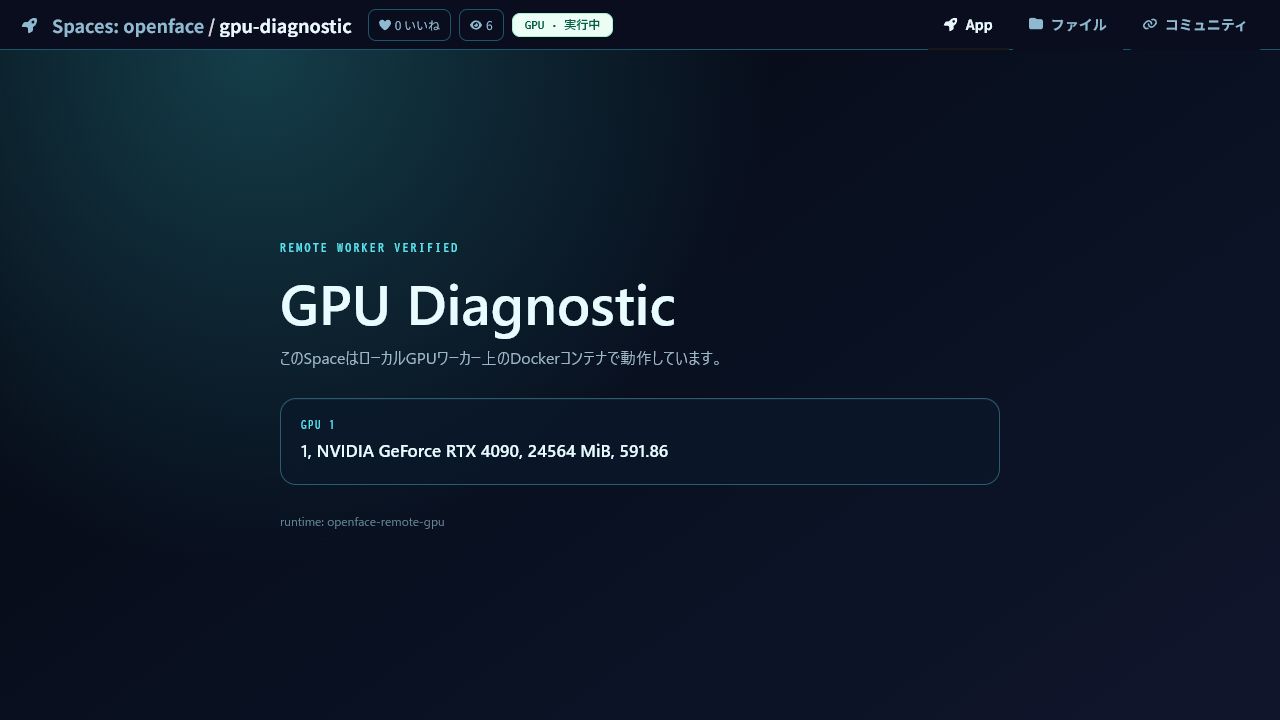
powershell -ExecutionPolicy Bypass -File scripts/test-rtx4090-matrix-lab.ps1The 2026-07-24 hardware run completed enrollment, two-GPU discovery, a single-device claim, build, runtime proxy, stop, and cleanup. The scheduler selected one device whose free VRAM satisfied the job. The Space container reported only its assigned resource:
- NVIDIA GeForce RTX 4090 — 24,564 MiB
- runtime response:
openface-remote-gpu
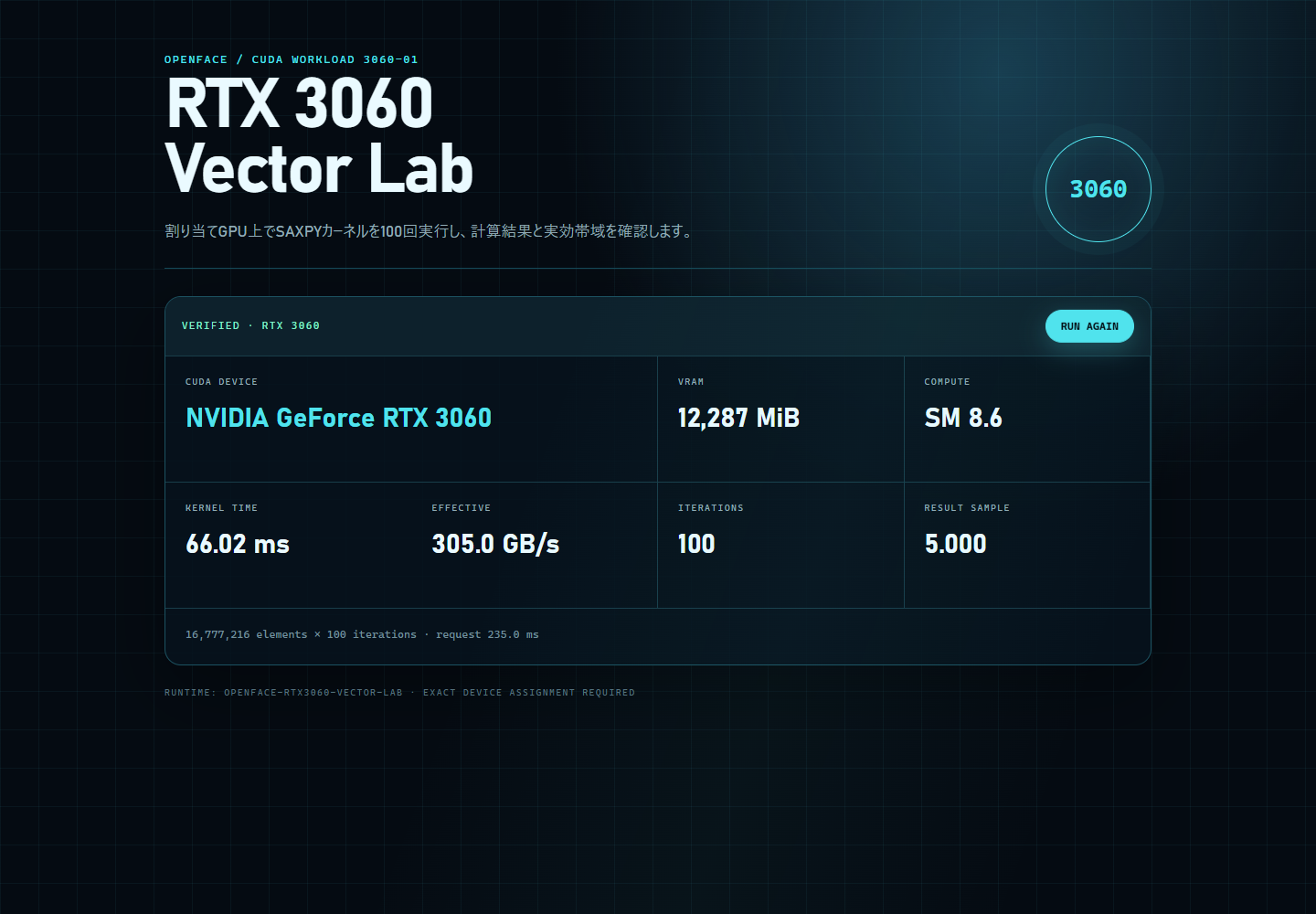
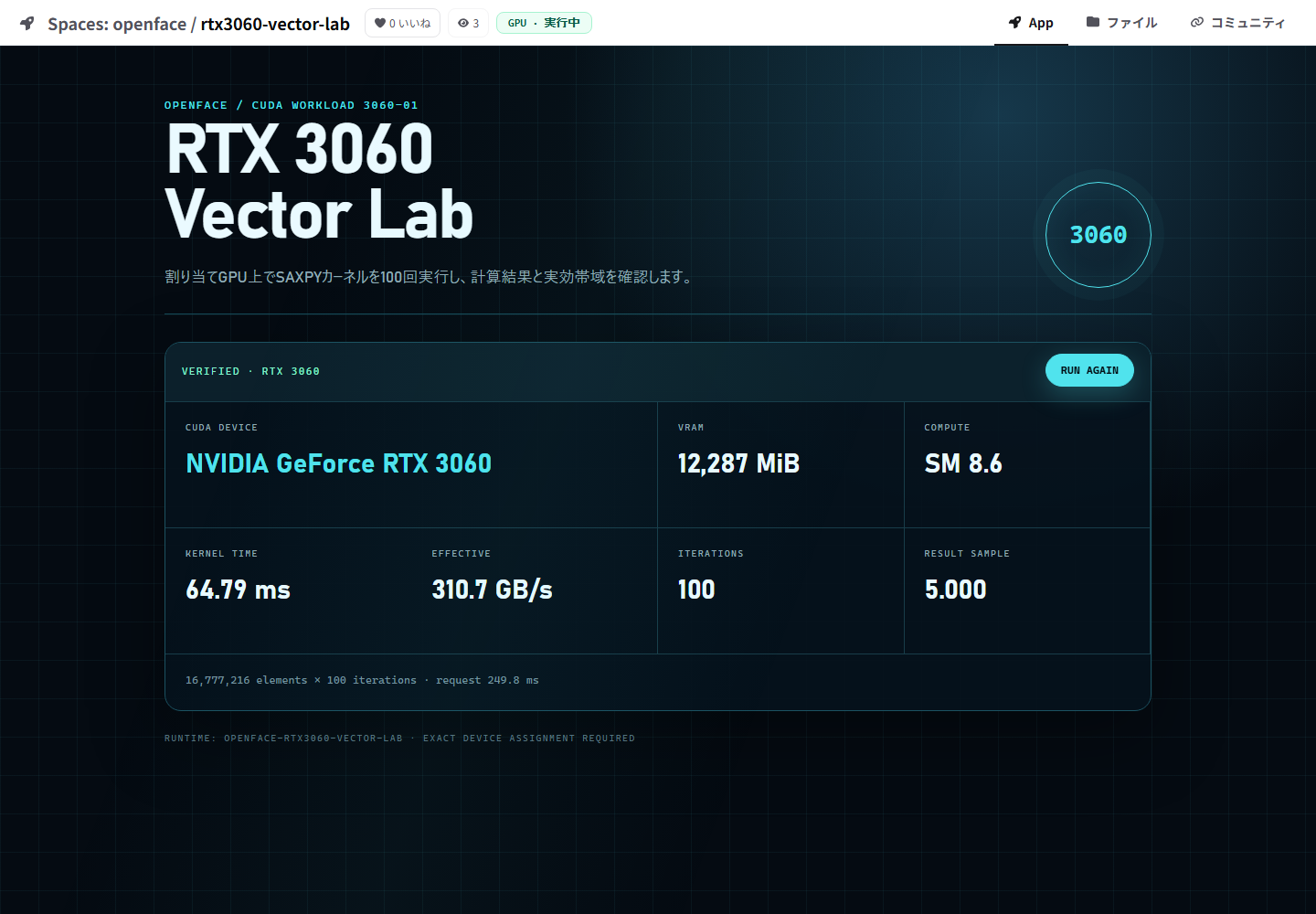
The 2026-07-25 RTX 3060 run selected the card by GPU UUID rather than ordinal index, because CUDA device ordering can differ from nvidia-smi ordering. The fixture compiled and ran 100 SAXPY iterations over 16,777,216 elements:
- NVIDIA GeForce RTX 3060 — 12,287 MiB, compute capability 8.6
- result sample:
5.000 - measured effective bandwidth: about 305 GB/s in the captured run
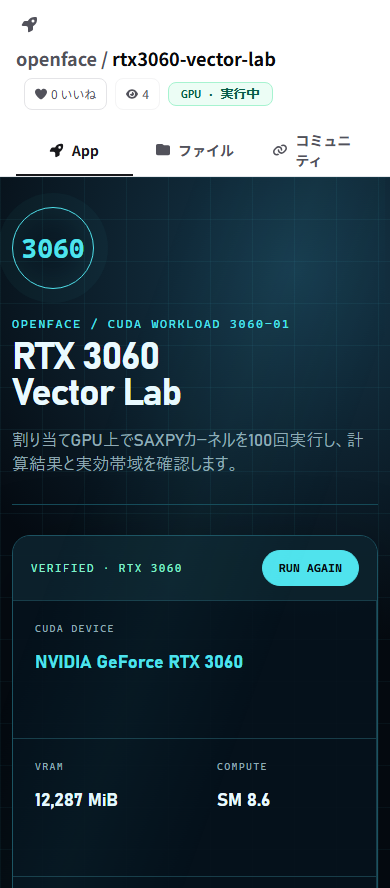
- desktop and 390 px mobile layouts: no horizontal overflow
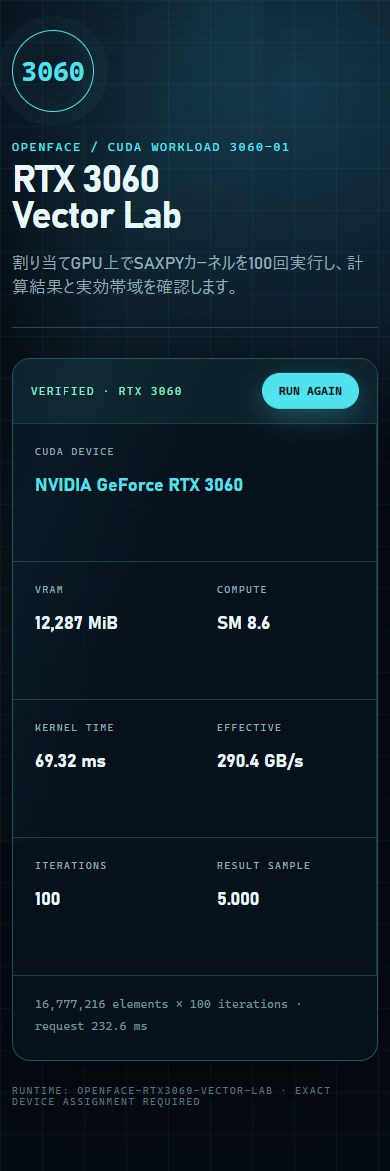
The fixture was also registered and started through OpenFace itself. The portal reported GPU · 実行中, loaded the app through the normal /run/ iframe, and returned device_match: true after RUN AGAIN:
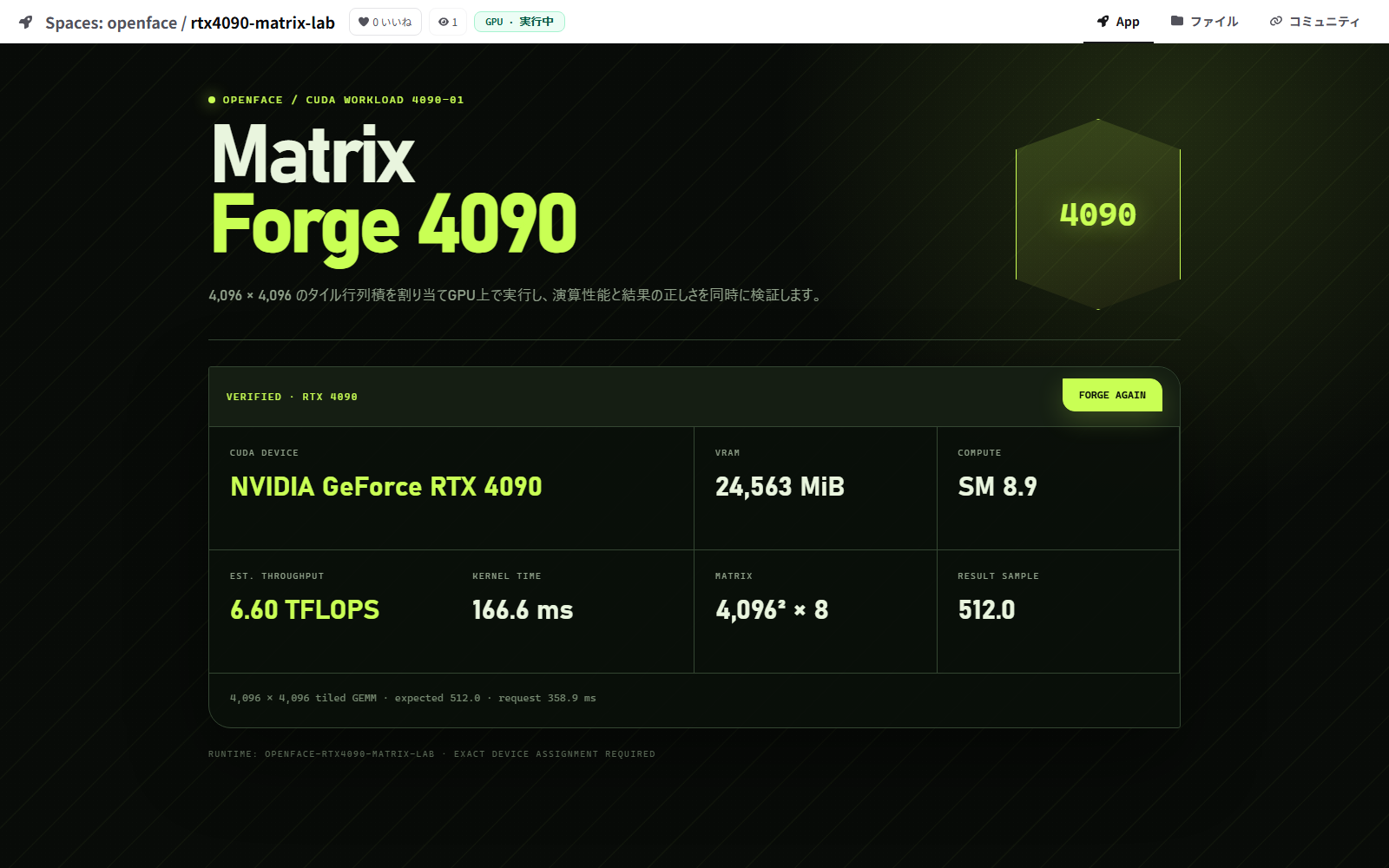
The 2026-07-25 RTX 4090 run used a 22 GiB scheduling floor. This excludes the 12 GB card while leaving room for display-driver allocations on the nominally 24 GB card. OpenFace claimed the worker, cloned exact revision bac7105ff404ec7594a68c014680cdacc28e2f16, built the Docker Space, and moved the job through queued, building, and running.
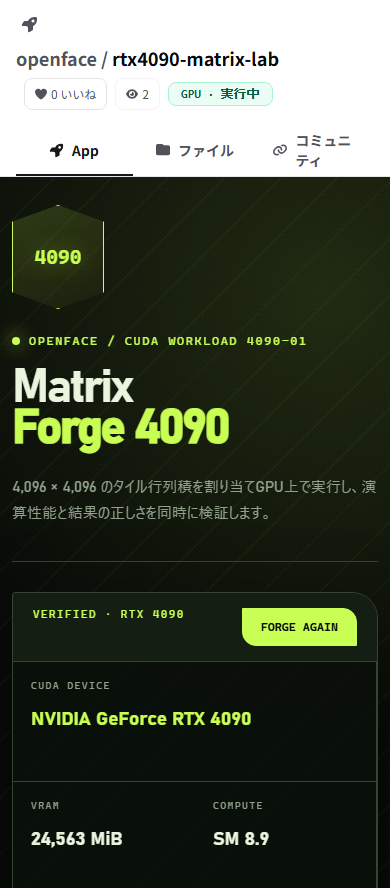
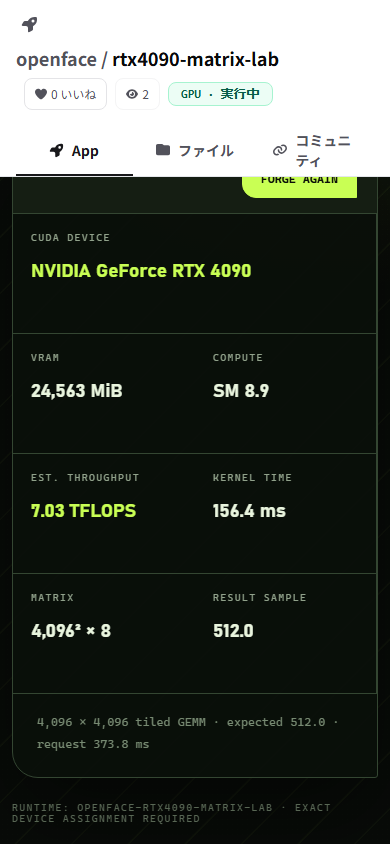
The eight-pass, 4,096 × 4,096 tiled matrix multiplication reported:
- NVIDIA GeForce RTX 4090 — 24,563 MiB, compute capability 8.9;
- estimated throughput: 6.60–7.04 TFLOPS for the reference kernel;
- result sample and expected sample:
512.0; device_match: truethrough the normal/run/proxy;- no horizontal overflow at 1,600 px desktop or 390 px mobile.
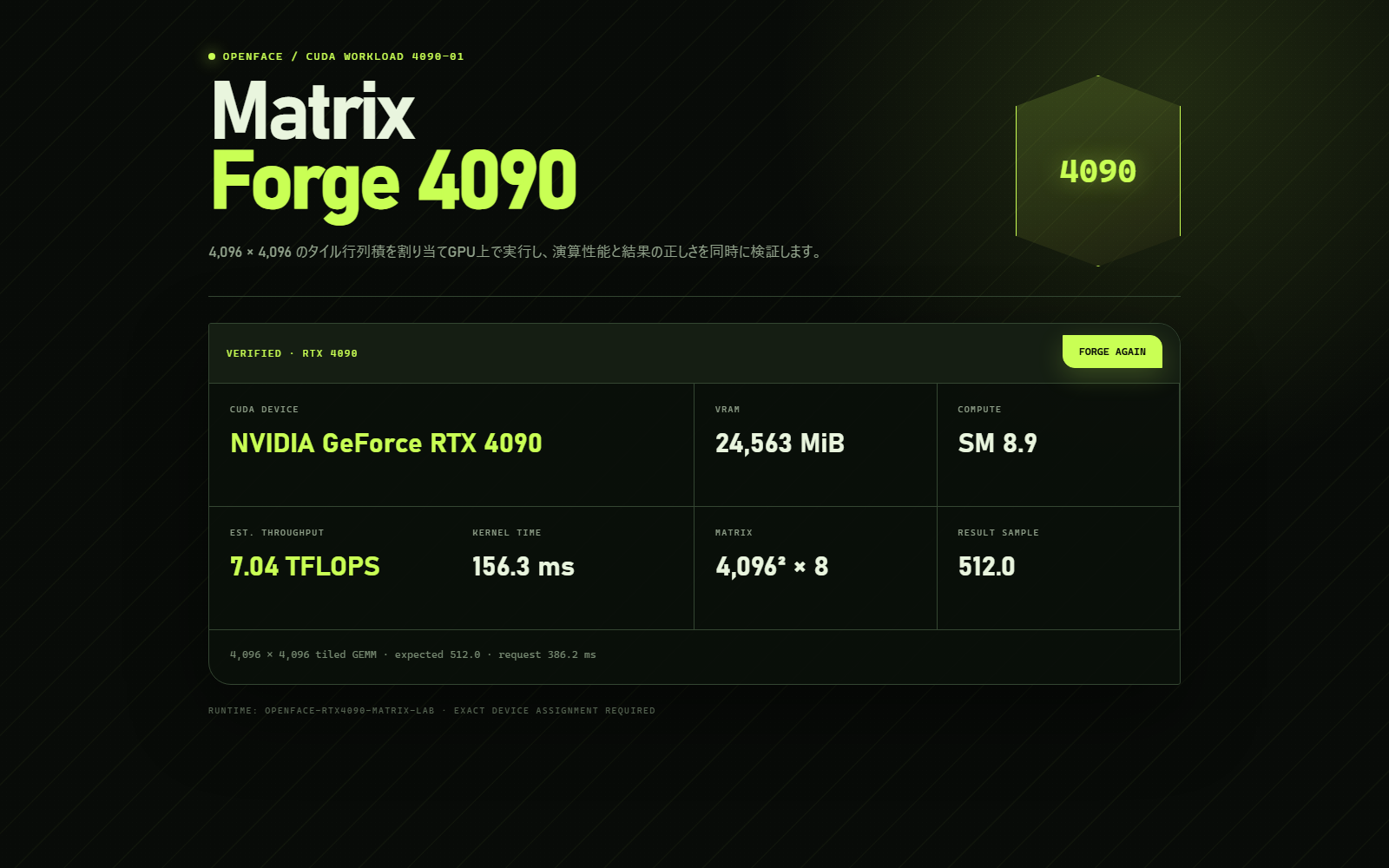
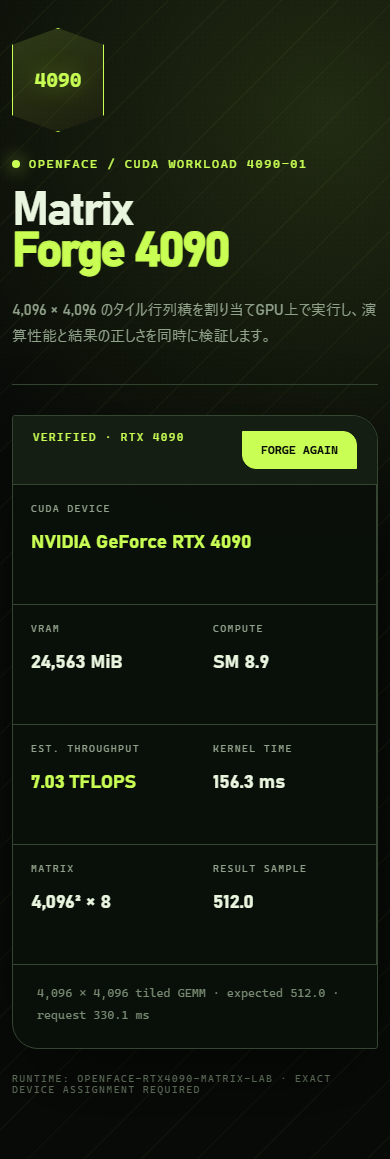
The fixture was published as openface/rtx4090-matrix-lab, started through OpenFace's management API, and verified in the complete portal shell:
This verification kept worker polling on the LAN. Its runtime return path used the already-connected Tailscale interface because the Windows host did not have an inbound LAN firewall rule for port 8787. OpenFace can start and stop the Space through its API, but it intentionally cannot change the Windows firewall. A direct-LAN return path therefore needs either that one host rule or an existing trusted route such as Tailscale.
Acceptance criteria
The first production-ready increment is complete when:
- existing CPU Spaces behave exactly as before;
- a GPU Space is built and served by the local GPU machine through the normal OpenFace URL;
- Forgejo permissions still protect start, stop, files, and runtime access;
- the GPU container can see only the assigned GPU resources;
- worker shutdown changes the Space to unavailable within the heartbeat window;
- reconnecting does not create duplicate containers or jobs;
- LXC reboot and worker reboot recover predictably;
- no Docker API, database port, or reusable plaintext enrollment token is exposed;
- logs and audit history identify the repository SHA and worker used;
- screenshot and interaction QA cover desktop and mobile runtime states.
Rollback
The worker feature should be guarded by a server-side feature flag. Disabling it stops new remote claims, marks remote runtimes unavailable, and returns scheduling to the current LXC-only behavior. Removing a worker must not delete Forgejo repositories, LFS objects, metrics, or job audit records.