Usage
Command Format
python main.py INPUT [OUTPUT] [options]If OUTPUT is omitted, the CLI creates ./output/<input-name>_<timestamp>/ automatically and saves a mode-specific file there.
For MatAnyone package integration, install matanyone2-runtime>=0.2.0 in a separate Python environment and pass that interpreter with --matanyone-python.
Full Video Export
python main.py input.mp4 --bg-color white
python main.py input.mov --format mp4 --bg-color white
python main.py input.mp4 output.mp4 --bg-image background.jpg
python main.py input.mp4 output.mp4 --fps 30
python main.py input.mp4 output.mp4 --size 300x300 --bg-color white
Regular video output does not preserve alpha transparency. If you want a visible background, pass --bg-color or --bg-image.
Transparent Frame Export
python main.py input.mp4 --interval 0.5 --format webp
python main.py input.mp4 output/frames --interval 1 --format png
python main.py input.mp4 output/frames --interval 1 --format webp --size 300x300
When --interval is set, OUTPUT is treated as a directory name instead of a file path.
Animated WebP / GIF Export
python main.py input.mp4 --animated webp
python main.py input.mp4 --animated webp --size 300x300
python main.py input.mp4 output/output_animated.webp --animated webp --webp-fps 10
python main.py input.mp4 output/output.gif --animated gif --webp-fps 8
python main.py input.mp4 output/output --animated both --webp-fps 8 --max-frames 120
With --animated both, the tool writes both .webp and .gif using the same base name.
MatAnyone Foreground + Alpha Pair Export
Use --matanyone when INPUT is either:
- a directory containing one
*_fg.*file and its matching*_alpha.*file - a foreground file such as
clip_fg.mp4
Examples:
python main.py assets/MatAnyone --matanyone output/matanyone.webp
python main.py assets/MatAnyone --matanyone output/matanyone_2fps_300.webp --webp-fps 2 --size 300x300
python main.py assets/MatAnyone --matanyone output/matanyone_5fps_300.webp --webp-fps 5 --size 300x300
python main.py assets/MatAnyone --matanyone output/matanyone_10fps_300.webp --webp-fps 10 --size 300x300
python main.py assets/MatAnyone --matanyone output/matanyone_10fps_300.gif --animated gif --webp-fps 10 --size 300x300
python main.py assets/MatAnyone --matanyone output/matanyone.mp4 --bg-color white
python main.py assets/MatAnyone --matanyone output/matanyone_frames --interval 0.5 --format png
Notes:
- Transparent alpha is preserved for animated
webp, animatedgif, and interval frame export. .webpoutput uses the provided alpha mask to build transparent frames.- Semi-transparent edges are decontaminated to reduce green fringes from the baked background.
--size 300x300with--webp-fps 5is a good default for compact previews.- Regular
mp4does not preserve alpha. The tool composites transparent pixels onto--bg-color,--bg-image, or black when neither is specified.
When you export several MatAnyone cleanup trials, encode the profile or tuning values in the output filename so the comparison stays reproducible, for example MatAnyone_cat3_trim_sm0_gb4_rb60_as180_am120_md255.webp.
MatAnyone2 Tile WebUI
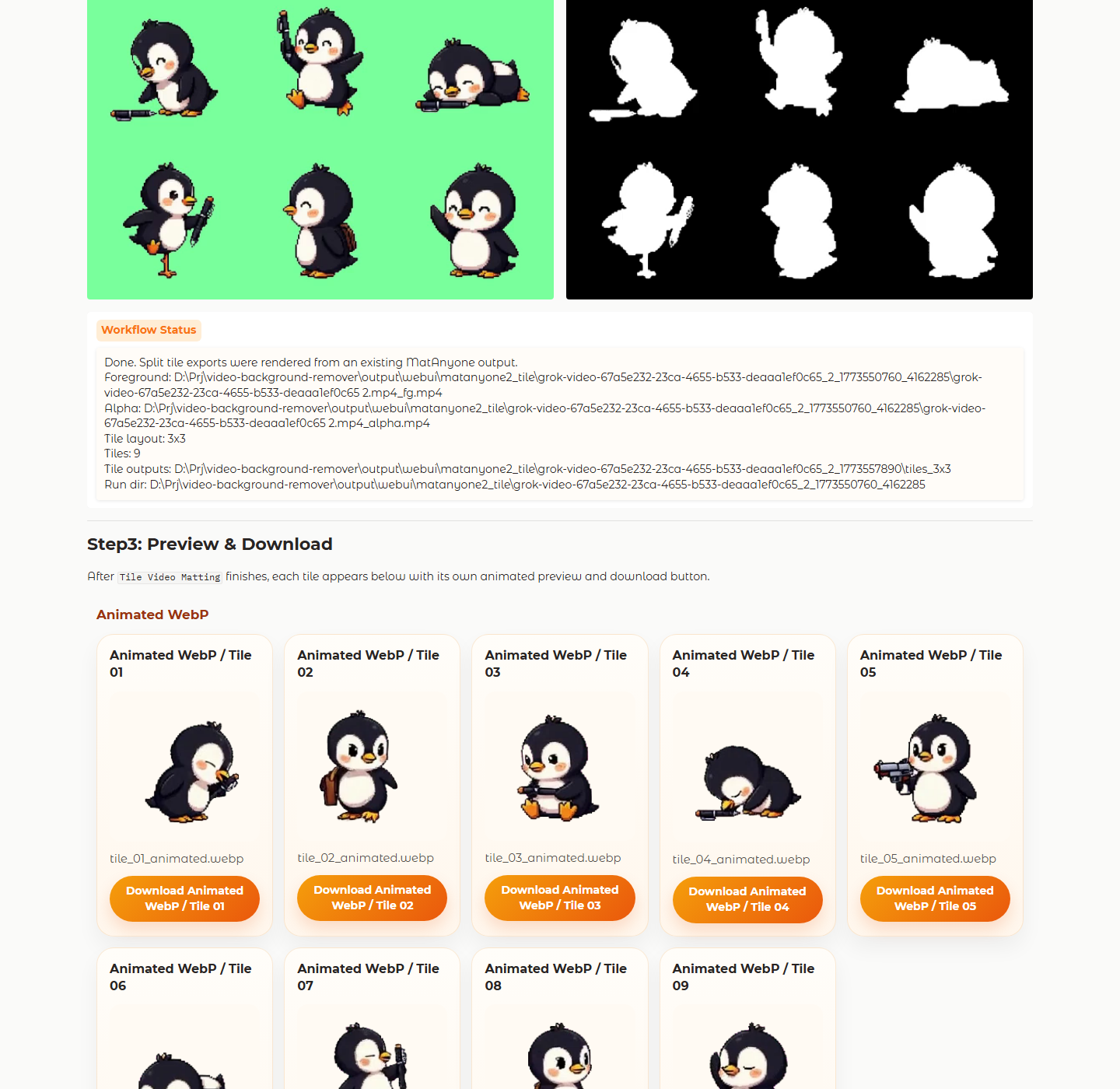
Use the MatAnyone2 Tile tab in the Gradio WebUI when the input is already arranged as a 2x2 or 3x3 tile sheet. The tab keeps the normal interactive mask workflow, then splits the finished foreground and alpha result into one animated webp and one animated gif per tile.
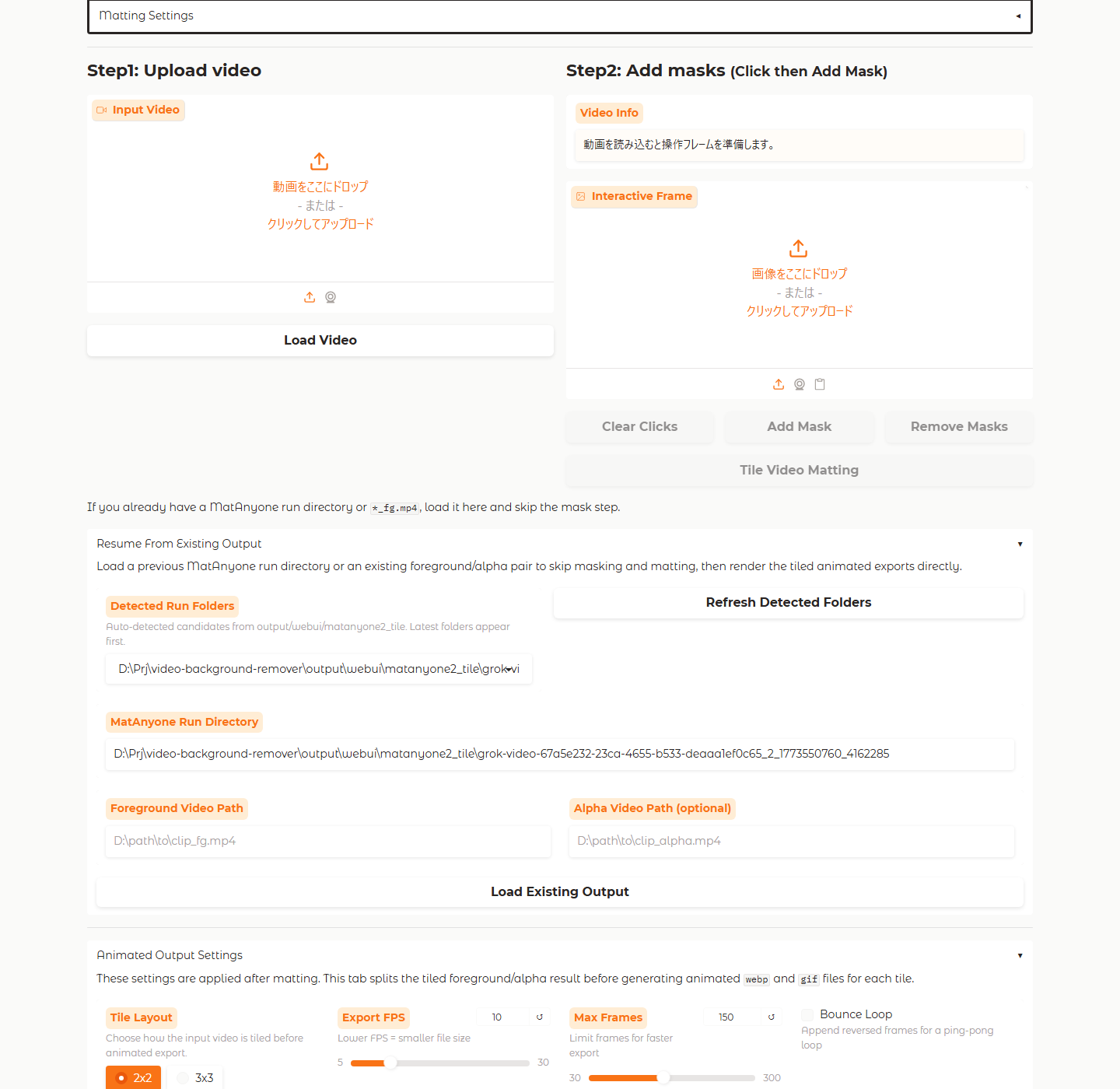
Tile workflow
- Load the tiled source video in
MatAnyone2 Tile. - Pick
2x2or3x3, add the mask, and runTile Video Matting. - Or, open
Resume From Existing Outputand select a detected Tile run folder to skip masking. - Adjust
Export FPS,Max Frames, andBounce Loop, then render the split tile exports.
Output structure
- Fresh runs and resumed runs both save into
output/webui/matanyone2_tile/<run-dir>/. - Split animations are written into
tiles_2x2/ortiles_3x3/. - The auto-detected resume list only shows Tile-specific run folders so the picker stays compact.
- If you need a different source, you can still paste an absolute run directory or
*_fg.mp4path manually.
output/webui/matanyone2_tile/<run-dir>/
├─ <source>.mp4_fg.mp4
├─ <source>.mp4_alpha.mp4
├─ metadata.json
└─ tiles_3x3/
   ├─ tile_01_animated.webp
   ├─ tile_01_animated.gif
   └─ ...
MatAnyone Package Backend
Use --backend matanyone when you want this CLI to import the published matanyone2-runtime package and generate the foreground and alpha pair for the current input.
python main.py input.mp4 output/out.webp --backend matanyone --matanyone-python C:\path\to\python.exe --animated webp
python main.py input.mp4 output/out.gif --backend matanyone --matanyone-python C:\path\to\python.exe --animated gif --positive-point 320,180
python main.py input.mp4 output/out.mp4 --backend matanyone --matanyone-python C:\path\to\python.exe --bg-color white
Options
| Option | Description |
|---|---|
--model | Background removal model. Default: isnet-general-use |
--backend | Regular input backend: rembg or matanyone |
--matanyone | Treat INPUT as a MatAnyone directory or *_fg.* foreground video and use the matching *_alpha.* video |
--alpha-video | Explicit alpha or mask video path for --matanyone mode |
--matanyone-python | Python executable where matanyone2-runtime is installed |
--matanyone-model | Package model name for the MatAnyone backend |
--matanyone-device | Device for the MatAnyone backend |
--matanyone-performance-profile | Performance profile forwarded to matanyone2-runtime |
--matanyone-sam-model-type | SAM model type forwarded to matanyone2-runtime |
--positive-point | Positive click prompt for the MatAnyone backend |
--negative-point | Negative click prompt for the MatAnyone backend |
--fps | FPS for regular video output. Defaults to the input video's FPS |
--bg-color | Background color. Supports white, black, green, blue, red, gray, transparent, or 255,128,0 |
--bg-image | Path to a background image |
--size | Output size as WIDTHxHEIGHT, for example 300x300 |
--keep-frames | Keep intermediate frames instead of deleting them |
--work-dir | Working directory for extracted frames |
--interval | Export frames every N seconds |
--format | Output format hint. Use webp or png for transparent frame or MatAnyone WebP output, or mp4 for regular video export |
--animated | Animated output mode: webp, gif, or both |
--webp-fps | FPS for animated output |
--max-frames | Maximum number of frames for animated output |
--no-bg-removal | Keep the original content when exporting animated files or interval frames |
--corner-radius | Apply transparent rounded corners to WebP, GIF, and PNG outputs |