Examples
Output Examples
| Type | File |
|---|---|
| Input video | assets/onizuka_idle_motion.mp4 |
| Animated WebP | example/output_animated.webp |
| GIF | output/output.gif |
| MatAnyone WebP 2 FPS / 300 px | output/matanyone_full_2fps_300.webp |
| MatAnyone WebP 5 FPS / 300 px | output/matanyone_full_5fps_300.webp |
| MatAnyone WebP 10 FPS / 300 px | output/matanyone_full_10fps_300.webp |
| MatAnyone GIF 10 FPS / 300 px | output/matanyone_full_10fps_300.gif |
| Comparison GIF | example/onizuka_walk_motion.gif |
| Comparison WebP | example/onizuka_walk_motion.webp |
| Transparent frames | output_frames_webp/ |
MatAnyone2 Tile WebUI Samples
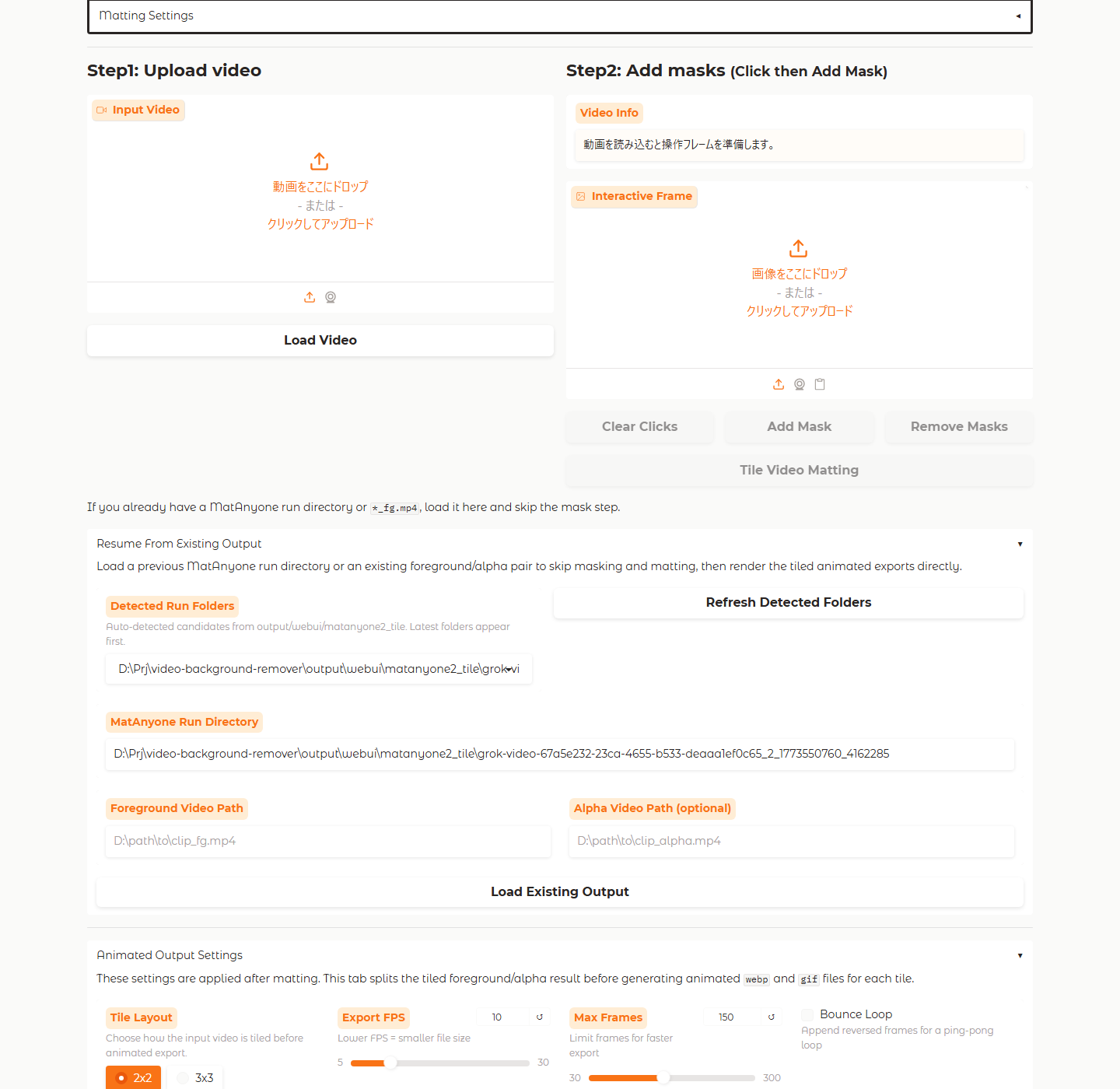
The Tile workflow now documents both the UI and the generated split animations. The screenshots below were captured from the MatAnyone2 Tile tab, and the sample animated assets come from the documented 3x3 run under docs/public/media/matanyone2_tile/.
Resume from an existing Tile run
Preview grid after split export
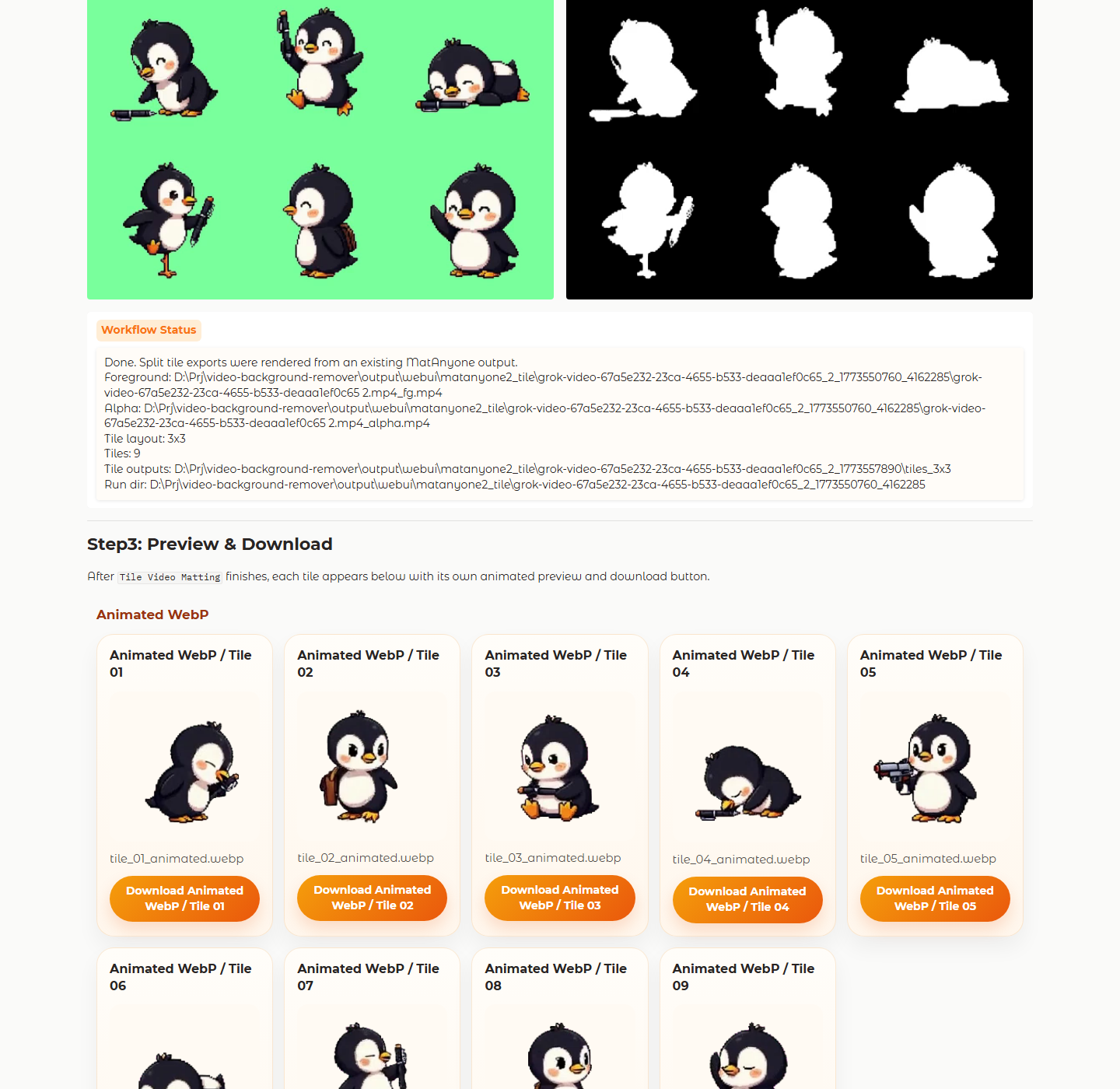
Sample 3x3 tile outputs
| Animated WebP tile | Animated GIF tile |
|---|---|
 |  |
Asset paths:
/media/matanyone2_tile/webui-resume-en.png/media/matanyone2_tile/webui-preview-en.png/media/matanyone2_tile/tiles_3x3/tile_01_animated.webp/media/matanyone2_tile/tiles_3x3/tile_01_animated.gif
MatAnyone Recipes
Transparent WebP from a foreground + alpha pair
python main.py assets/MatAnyone --matanyone output/matanyone.webpCompact preview: 5 FPS at 300 px
python main.py assets/MatAnyone --matanyone output/matanyone_5fps_300.webp --webp-fps 5 --size 300x300Smaller preview: 2 FPS at 300 px
python main.py assets/MatAnyone --matanyone output/matanyone_2fps_300.webp --webp-fps 2 --size 300x300Smoother preview: 10 FPS at 300 px
python main.py assets/MatAnyone --matanyone output/matanyone_10fps_300.webp --webp-fps 10 --size 300x300Animated GIF at 10 FPS
python main.py assets/MatAnyone --matanyone output/matanyone_10fps_300.gif --animated gif --webp-fps 10 --size 300x300Flatten to MP4 with a white background
python main.py assets/MatAnyone --matanyone output/matanyone.mp4 --bg-color whiteNotes for MatAnyone inputs
- The alpha video controls which pixels stay visible: white stays, black becomes transparent.
- The exporter removes green matte contamination from semi-transparent edges before saving.
300x300plus5fpsis usually a strong quality-to-size balance for previews.
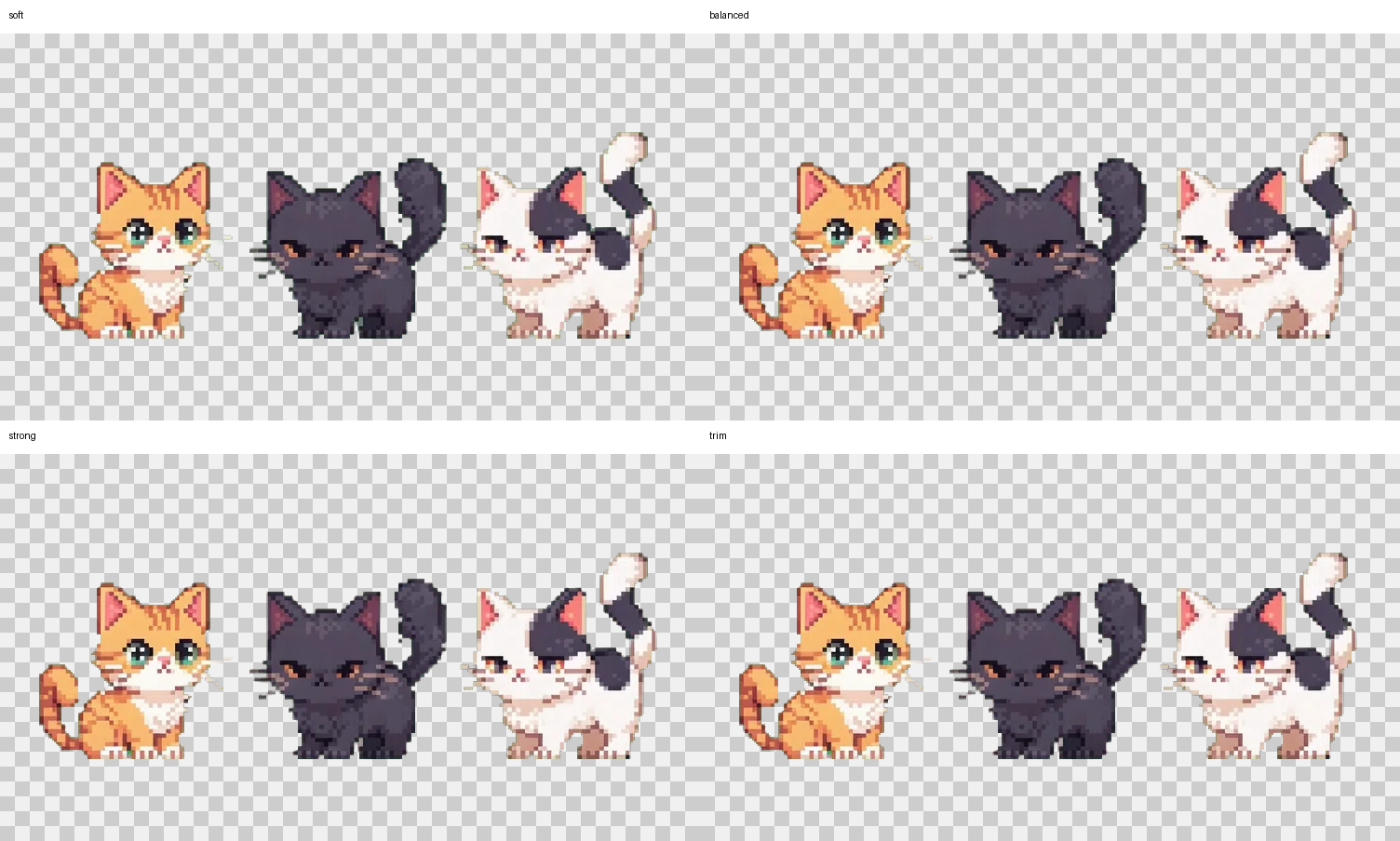
Green Fringe Cleanup Comparison
This preview compares four MatAnyone cleanup strengths on assets/MatAnyone_cat3. soft keeps the fullest silhouette, while strong and trim suppress more visible green spill on whiskers and tails.
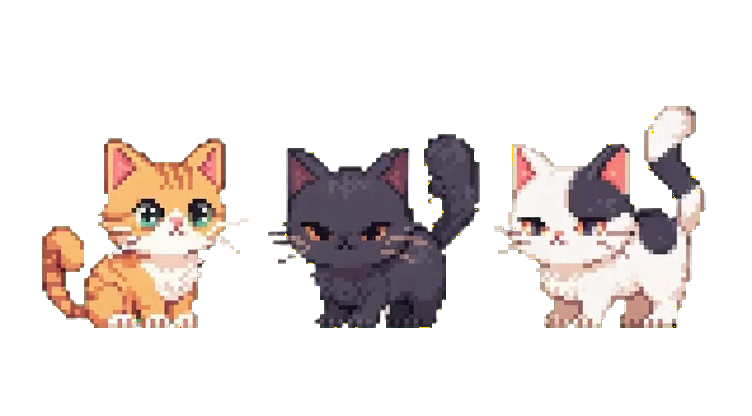
The residual map below highlights edge pixels where green is still stronger than red or blue after cleanup. It helps show the remaining hotspots instead of relying only on visual inspection.
- When saving multiple tuning candidates, include the profile or parameter token in the filename, for example
MatAnyone_cat3_trim_sm0_gb4_rb60_as180_am120_md255.webp. - In the filename tokens,
sm=spill margin,gb=green bias,rb=red boost,as=alpha spill,am=alpha matte, andmd=max drop.
Experiment: Fire Effect Clip
Test clip: assets/onizuka_fire_motion.mp4
Settings used:
python main.py assets/onizuka_fire_motion.mp4 output/model.webp --animated webp --webp-fps 8 --model <model>Summary
siluetaproduced the best overall balance on this clip.u2netkept the silhouette stable, but removed most of the fire aura.u2net_human_segwas not suitable for this stylized, effect-heavy sample.
Model Previews
| Model | Preview | Runtime | Notes |
|---|---|---|---|
isnet-general-use |  | 114.44s | Preserves some effect detail, but leaves halo noise around the subject. |
u2net |  | 76.42s | Strong silhouette stability, but most of the fire aura disappears. |
u2netp |  | 30.11s | Fastest run, but quality drops on harder fire frames. |
u2net_human_seg |  | 69.97s | Loses most of the character on this stylized clip. |
silueta |  | 69.27s | Best balance of shape retention and cleanup in this comparison. |
Visual Comparison Sheet
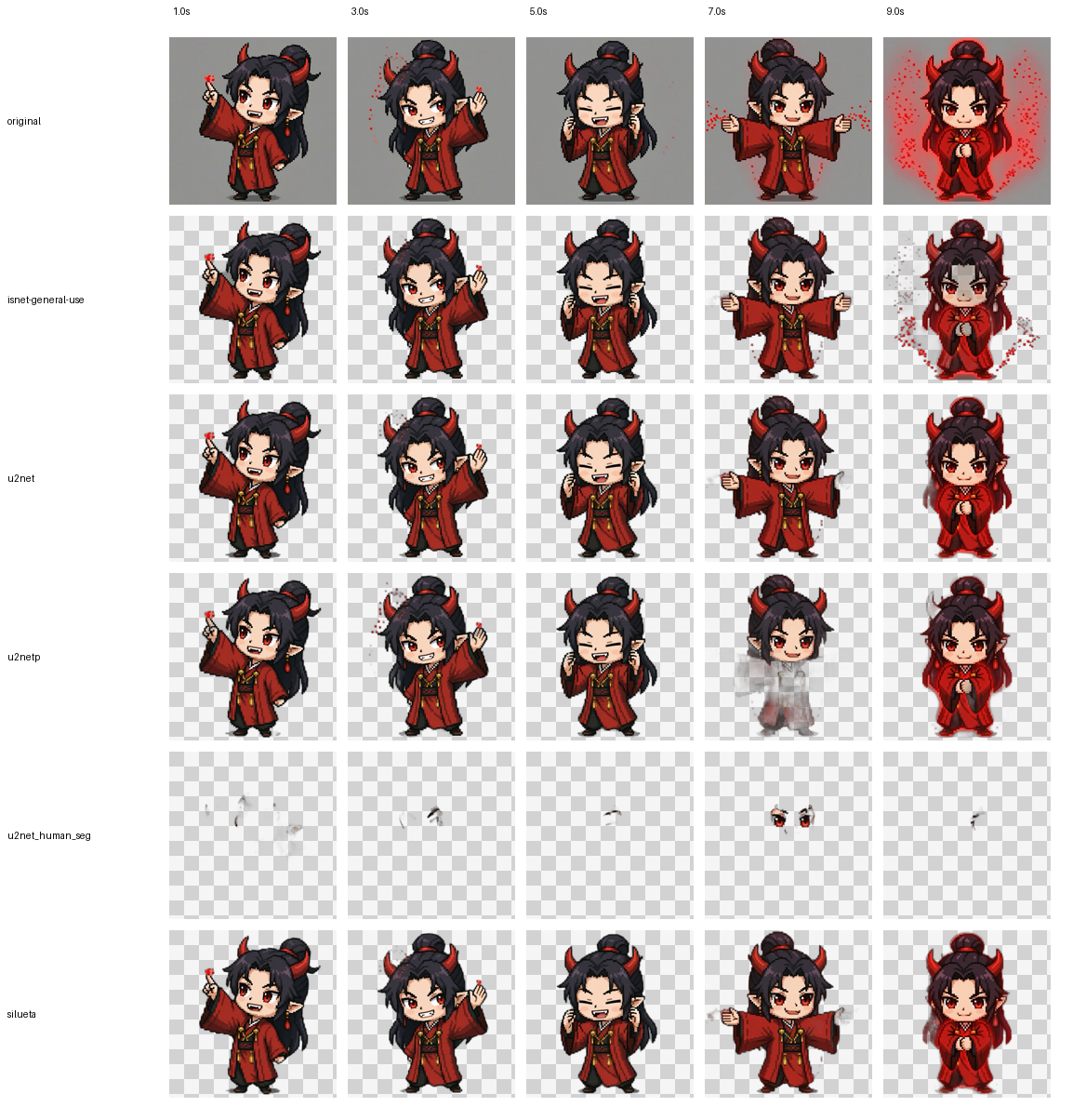
Representative frames sampled at 1.0s, 3.0s, 5.0s, 7.0s, and 9.0s. This makes it easier to spot where the aura survives and where the subject breaks apart.
Mask Comparison Sheet
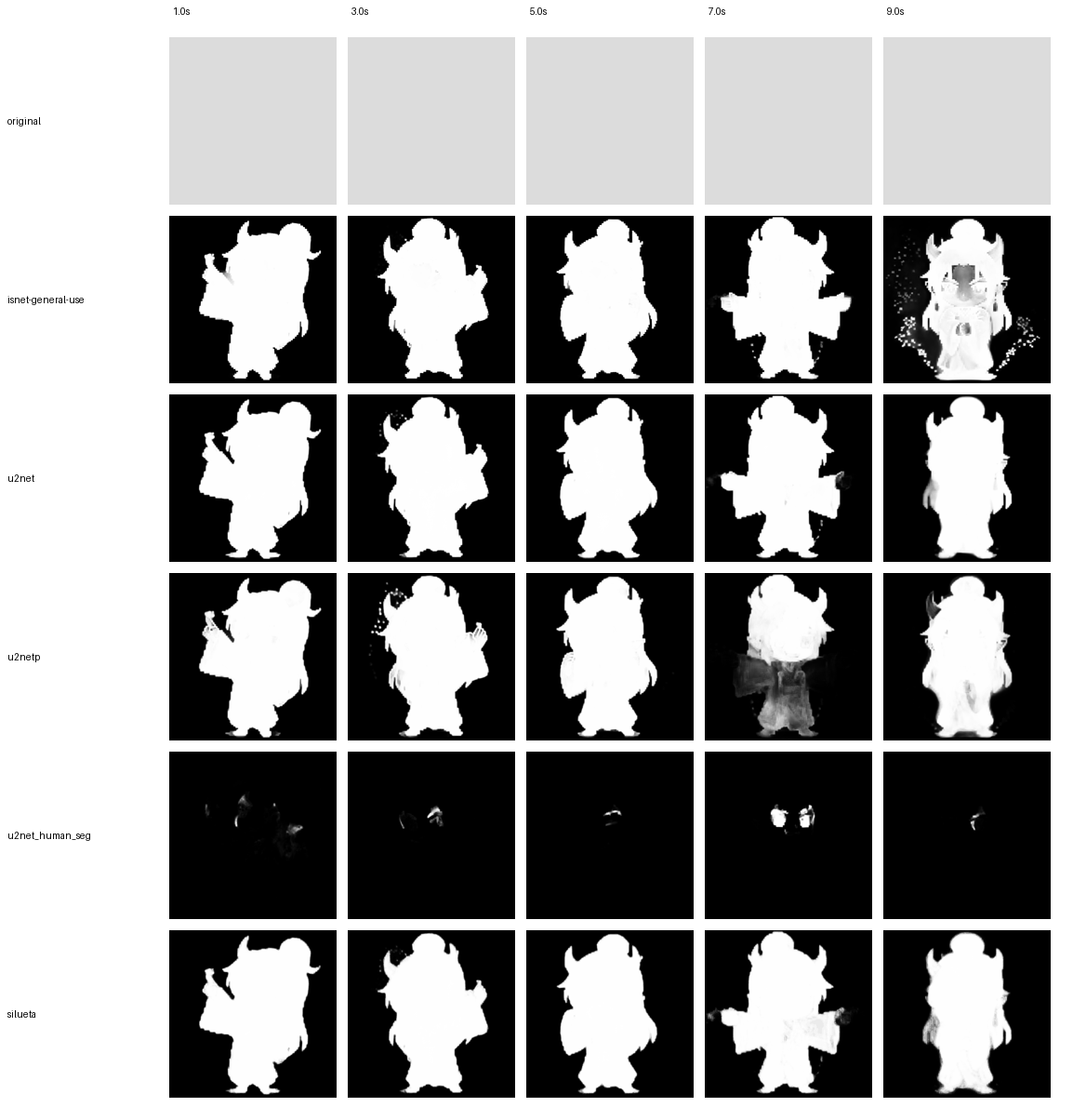
The alpha-mask view is useful for checking subject coverage. u2net_human_seg collapses on this clip, while silueta, u2net, and isnet-general-use keep a far more complete silhouette.
Re-run the Experiment
The tracked experiment definition is stored under experiments/onizuka_fire_motion/.
- Script:
experiments/onizuka_fire_motion/run_experiment.py - Config:
experiments/onizuka_fire_motion/experiment_config.json - Notes:
experiments/onizuka_fire_motion/README.md - Output directory:
output/model_experiments/onizuka_fire_motion/
Run it from the repository root:
python experiments/onizuka_fire_motion/run_experiment.pyTo test an additional model later, add it to the models array in experiments/onizuka_fire_motion/experiment_config.json and run the same command again.
The script regenerates:
<model>_anim.webp<model>_anim_frames/results.csvalpha_stats.csvcomparison_sheet.pngcomparison_masks.png