Architecture
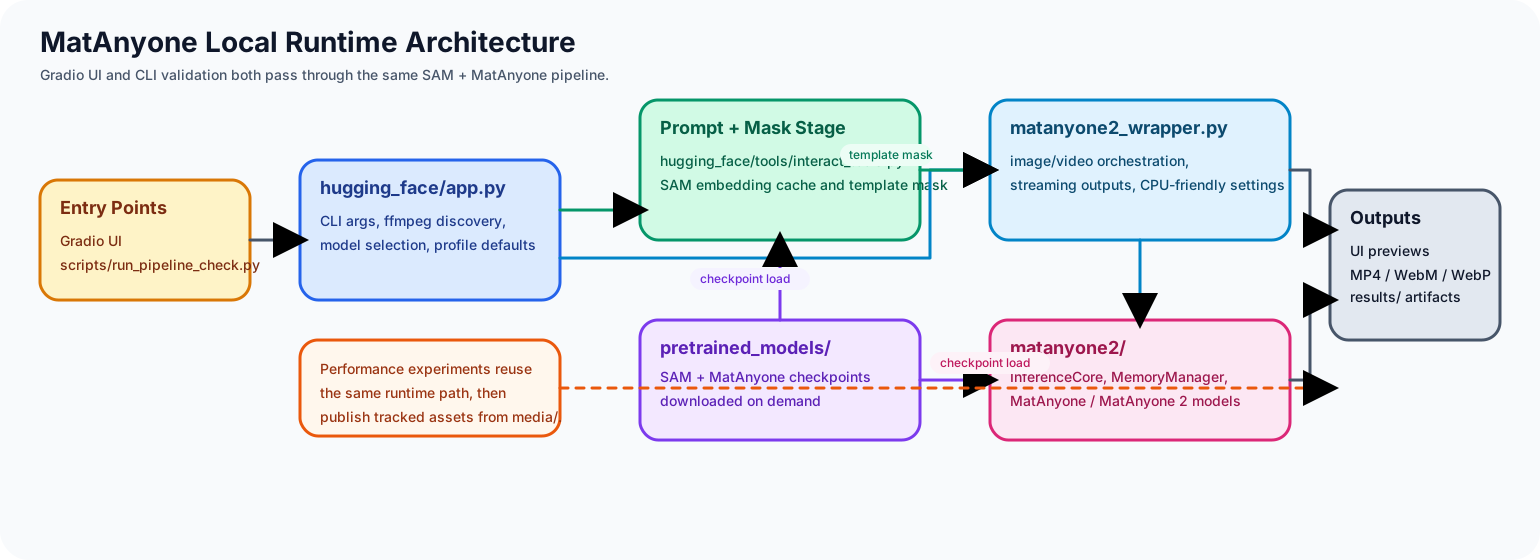
Diagram source files:
media/matanyone-architecture.drawiomedia/matanyone-architecture.svg
Repository layout
hugging_face/app.py: Gradio entrypoint and UI wiringhugging_face/matanyone2_wrapper.py: matting loop wrapper around the inference corehugging_face/tools/: click prompting, mask painting, download helpers, UI support codematanyone2/demo_core.py: shared runtime for Gradio and CLI, including ffmpeg setup, media loading, SAM integration, matting orchestration, output writing, and debug artifact exportmatanyone2/cli.py: direct CLI entrypoint for validation and reproducible runsmatanyone2/gradio.py: package-friendly Gradio launcher used by thematanyone-gradioconsole scriptmatanyone2/: upstream model and inference implementationpretrained_models/: downloaded checkpointsresults/: generated output artifacts
Runtime flow
matanyone-gradio,matanyone-cli,matanyone2-runtime,python -m matanyone2 <cli|webui>, or the legacy wrapper script parse runtime flags and forward execution intomatanyone2/demo_core.py.- ffmpeg and required checkpoints are resolved and downloaded into
pretrained_models/if missing. - Media is loaded into a shared session state with source size, working size, frame count, FPS, and optional audio metadata.
- SAM prompt points are converted into a template mask on the selected frame.
- The matting loop runs through the shared inference path and produces foreground/alpha outputs.
- Final outputs and debug artifacts are written into a dedicated run folder under
results/<input-name>_<timestamp>/.
Diagram reading notes
- Both the Gradio app and the CLI feed into the same orchestration layer in
matanyone2/demo_core.py. - SAM prompt processing and MatAnyone inference are separated so we can optimize them independently.
pretrained_models/is a shared runtime dependency for both SAM and MatAnyone checkpoints.- Public docs and README previews use tracked assets from
media/instead of ignored files fromresults/. - Debugging is easier now because every run writes its own input snapshots, SAM previews, masks, output previews, and
metadata.jsoninto the run folder.
Why docs live separately
This repository is expected to grow beyond a single README. The docs/ site gives us a stable place for:
- onboarding pages
- architecture notes
- future model management guides
- release notes or migration docs
- contributor-facing explanations
Deployment
The repository now has a simple split between validation, documentation publishing, and release packaging:
Repo Checksvalidates docs, maintained Python files, and package entrypointsDocs Pagespublishes the VitePress siteRelease Packagebuilds wheel and sdist artifacts for tagged releases
That gives us one workflow for day-to-day safety and separate workflows for published outputs.